Yep, we may get a tiny thank-you (read: commission) when you buy through links on Gadgetspotr — not enough for a yacht, but enough to keep the lights (and servers) on. Learn more
46 Highlights 117 Differences 0 Reactions 0 Likes
EinScan H Facts: 143 Specifications & 46 Highlights
Get the facts before you unbox. The EinScan H 3d scanner features 143 key specs & features, with depth of field, supported object materials, operating temperature range & operating humidity range topping the list.
A fast snapshot of the EinScan H, covering its standout specification and what you can expect right out of the box.
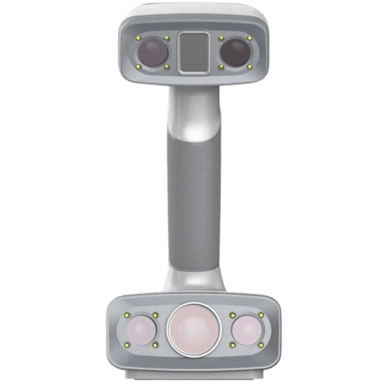
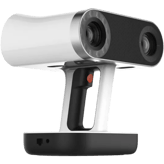
EinScan H
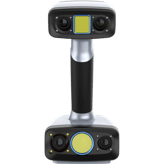
The EinScan H is a professional-grade handheld 3D scanner that combines two different light sources to capture both fine details and large surfaces with ease. It features a specialized mode for scanning people, using invisible infrared light to safely and comfortably map hair and dark colors that are usually difficult to track. With its built-in color camera and ergonomic design, it is a perfect tool for medical applications, artistic design, and creating realistic digital characters.
Quick Specs Breakdown
The key specs that actually matter—no fluff, no guesswork
Here’s a streamlined view of the EinScan H key specifications. Compare critical features at a glance before exploring the full specs and hands-on insights below.
Scanning Volume & Range
Depth of Field
What is the depth of field?
27.559 inch
Minimum Scan Volume
What is the minimum scan volume?
30 x 30 x 30 mm
Object Compatibility
Supported Object Materials
What materials can be scanned?
Plastic, Metal
Human Body Scanning
Can it scan the human body?
Yes
Environmental & Operating Conditions
Operating Temperature Range
What is the operating temperature range?
32–104°F
Operating Humidity Range
What humidity levels are supported?
10-90%
Compatibility & System Requirements
Minimum RAM Requirement
How much RAM is required?
64 GB
Supported Operating Systems
Which operating systems are supported?
Windows
Certifications & Compliance
Safety Certifications
What safety certifications does it have?
CE, UL, FCC, RoHS
Industry Standards Compliance
Which industry standards are supported?
ISO 9001
Accuracy & Resolution
Resolution Level
What is the resolution level?
0.0098 inch
Edge Sharpness
How sharp are captured edges?
Sharp
Software & Processing
Smoothing Tools
Are smoothing tools included?
Yes
Included Software
What software is included?
ScanStudio
Output & File Formats
Color Data Export
Is color data included in exports?
Yes
Texture File Formats
What texture formats are supported?
JPG,PNG
Connectivity & Interfaces
Cable Length
What is the cable length?
6.56 ft
Data Transfer Speed
What is the data transfer speed?
USB 3.0
Hardware & Design
Mounting Thread Type
What mounting thread does it use?
1/4-inch
Protective Features
What protective features are included?
Anti-Scratch
Power & Battery
Power Consumption
How much power does it consume?
10 Watt
Power Source
What is the power source?
USB Powered
Security & Data Handling
Data Ownership Policy
Who owns the scan data?
User
Offline Mode
Can it work offline?
Yes
General Information
Mounting Type
How is the scanner mounted?
Handheld
Intended Use
What is the intended use?
3D Printing,Healthcare,Design,AR/VR
Scanning Performance
Scan Stability
How stable is the scanning process?
High
Scan Speed
What is the scan speed?
15 fps
Optics & Sensors
Camera Resolution
What is the camera resolution?
5 mp
Number of Cameras
How many cameras are included?
3
Capture Modes & Technology
Scanning Mode
What scanning modes are supported?
Handheld
Markerless Scanning
Does it support markerless scanning?
Yes
Dimensions & Weight
Width
What is the scanner width?
4.25 inch
Depth
What is the scanner depth?
4.33 inch
Accessories & Expansion
Included Accessories
What accessories are included?
USB Cable, Power Adapter, Calibration Board, Carrying Case
Replacement Parts Availability
Are replacement parts available?
Yes
Warranty & Support
Warranty Duration
How long is the warranty?
1 Year
Support Channels
What support channels are available?
Email, Phone
Calibration & Maintenance
Calibration Frequency
How often is calibration needed?
Periodic
Firmware Update Method
How are firmware updates performed?
Software-Based
Specifications & Facts 143
Specs measured. Drama avoided.
From specs to pricing quirks, we reviewed the EinScan H 3d scanner and measured it up to other 3d scanners. Want the crowd verdict? It’s here.
3D Scanner in this range Who knows? (Help us out by suggesting one!)
EinScan H
The depth of field is 27.559 inch (approximately 70.00 cm), indicating the usable range within which the scanner can keep features in acceptable focus.
A larger depth of field reduces the need for frequent refocusing during handheld scanning of objects with varying depths.
Describes the usable distance range where objects remain in focus.
Don’t keep it to yourself — be the first to react and review the Depth of Field on EinScan H ◉ and help others decide!
3D Scanner in this range Who knows? (Help us out by suggesting one!)
EinScan H
The minimum reliable scan volume is 30 x 30 x 30 mm, indicating the scanner can capture small parts roughly 3 cm on each side.
For best results, ensure the object fills at least this volume to allow the software to reconstruct geometry accurately.
Describes the smallest effective 3D space the scanner can accurately capture.
Don’t keep it to yourself — be the first to react and review the Minimum Scan Volume on EinScan H ◉ and help others decide!
EinScan H Maximum Object Size
What is the maximum object size?
35.43 inch 0Votes
3D Scanner in this range Who knows? (Help us out by suggesting one!)
EinScan H
The maximum object size is 35.433 inch (approximately 90.00 cm), which is the largest single object the scanner can handle without stitching very large sections.
For objects larger than this, multiple scans and alignment steps are typically required.
Shows the largest object dimension supported by the scanner.
Don’t keep it to yourself — be the first to react and review the Maximum Object Size on EinScan H ◉ and help others decide!
EinScan H Maximum Scan Distance
What is the maximum scan distance?
27.56 inch 0Votes
3D Scanner in this range Who knows? (Help us out by suggesting one!)
EinScan H
The maximum scan distance is 27.559 inch (around 70.00 cm), defining how far the scanner can reliably sense a subject.
Operating within this range ensures sufficient signal strength for accurate depth and geometry capture.
Indicates the farthest distance at which scanning remains effective.
Don’t keep it to yourself — be the first to react and review the Maximum Scan Distance on EinScan H ◉ and help others decide!
EinScan H Field of View Width
What is the field of view width?
16.54 inch 0Votes
3D Scanner in this range Who knows? (Help us out by suggesting one!)
EinScan H
The field of view width is 16.535 inch (around 42.00 cm), determining the lateral span captured in a single frame.
A wider FOV can speed capture of medium-sized objects by covering more area per frame.
Measures the horizontal capture width in a single scan frame.
Don’t keep it to yourself — be the first to react and review the Field of View Width on EinScan H ◉ and help others decide!
EinScan H Field of View Height
What is the field of view height?
17.32 inch 0Votes
3D Scanner in this range Who knows? (Help us out by suggesting one!)
EinScan H
The field of view height is 17.323 inch (approximately 44.00 cm), specifying the vertical span captured in one exposure.
Combined FOV dimensions help estimate coverage area and plan scanning passes.
Measures the vertical capture height in a single scan frame.
Don’t keep it to yourself — be the first to react and review the Field of View Height on EinScan H ◉ and help others decide!
EinScan H Minimum Object Size
What is the minimum object size?
1.18 inch 0Votes
3D Scanner in this range Who knows? (Help us out by suggesting one!)
EinScan H
The minimum object size noted is 1.18 inch (about 3.00 cm), indicating the smallest object that can be reliably captured.
Very small or delicate parts may still require special fixturing or close-range setups to ensure full coverage.
Indicates the smallest object dimension that can be reliably scanned.
Don’t keep it to yourself — be the first to react and review the Minimum Object Size on EinScan H ◉ and help others decide!
EinScan H Minimum Scan Distance
What is the minimum scan distance?
7.87 inch 0Votes
3D Scanner in this range Who knows? (Help us out by suggesting one!)
EinScan H
The minimum recommended scan distance is 7.87 inch (approximately 20.00 cm), which defines how close the scanner should be to the subject for reliable capture.
Maintaining at least this distance helps preserve focus, tracking, and measurement consistency during handheld scanning.
Represents the closest distance the scanner can be to the object.
Don’t keep it to yourself — be the first to react and review the Minimum Scan Distance on EinScan H ◉ and help others decide!
3D Scanner in this range Who knows? (Help us out by suggesting one!)
EinScan H
The minimum RAM requirement is 64 GB, meaning the recommended working memory for handling large point clouds and high-resolution meshes is substantial.
Systems with this amount of RAM will handle complex reconstructions and multi-scan projects more smoothly.
Indicates the minimum system memory needed for operation.
Don’t keep it to yourself — be the first to react and review the Minimum RAM Requirement on EinScan H ◉ and help others decide!
 Supermod
  Moderator